The short answer: building a content factory in-house is not about saving money. It is about control — over cost, over quality checks, and over your own data. Off-the-shelf tools can produce a piece of content, but they will not tell you why it is expensive, why it is wrong, or how to roll back when it breaks. You only learn those three things by building it yourself.
Here is the honest ledger for the first 35 days, including three incidents. Every number comes from the repository or the billing records; the scope is stated next to it.
The numbers
| Item | Value | Scope |
|---|---|---|
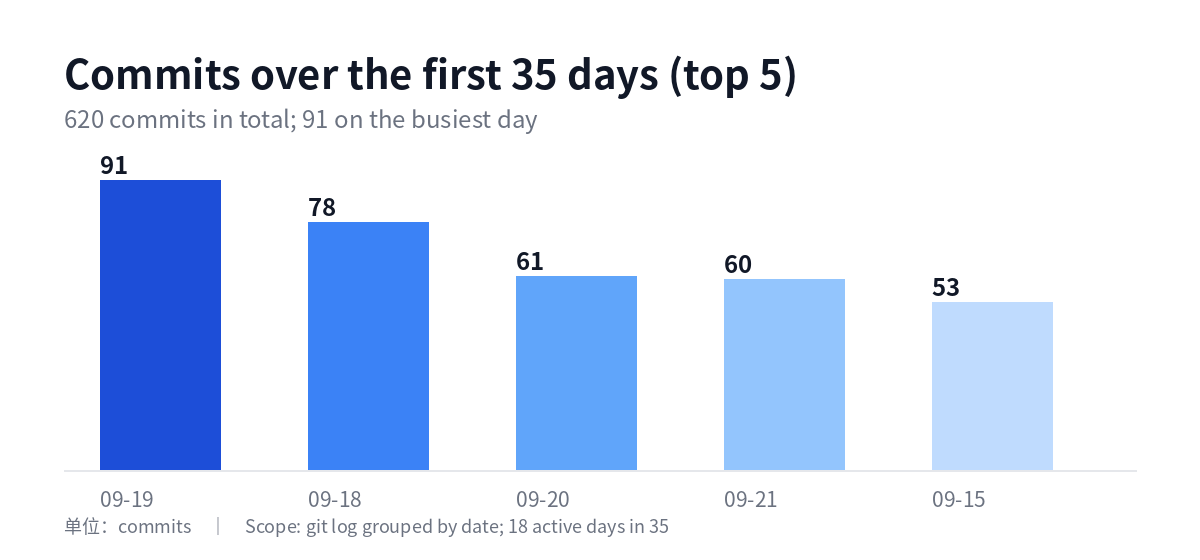
| Period | 2026-09-15 → 10-19 (35 days) | First commit to writing |
| Commits | 620 | git rev-list --count |
| Active days | 18 | Days with at least one commit |
| Busiest day | 91 commits | 09-19, the architecture refactor |
| Model bill | ≈ USD 29.8 / 35 days ≈ USD 25/month | API calls only; power and hardware excluded |
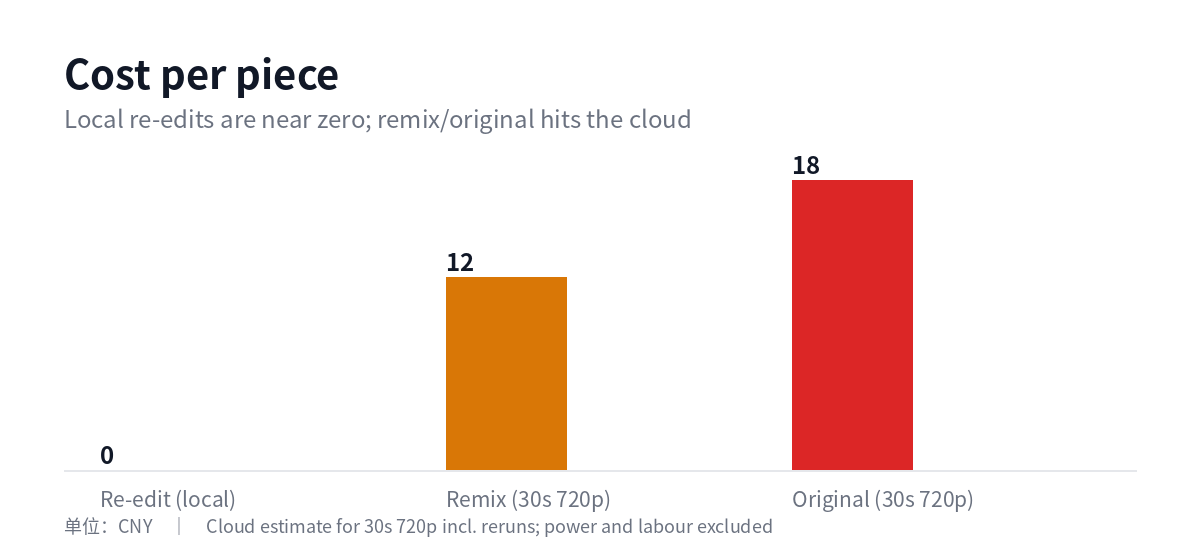
| Cost per piece (re-edit) | ≈ 0 yuan | Runs entirely on local hardware |
| Cost per piece (remix / original) | 12–18 yuan | 30-second 720p, including rerun headroom |
Scope note: the model bill only counts calls with a known price. Some models are unpriced and therefore not included, so “USD 25/month” is a floor, not the full cost.
Three real incidents (more useful than an architecture diagram)
1. The backup “failed daily” — the offsite copy was actually 10 days behind
Symptom: the backup service failed three days in a row with status=1/FAILURE. The log contained only an exit code.
Cause: the credential file held two sets of account-level keys. The script read them in order, so the second set overwrote the first — and the second set had no permission. Every run returned 403.
The real cost: tracing it further showed the offsite copy was not three days behind, but ten days behind (the last cloud object was from 09-30). The log understated the severity.
Fix: comment out the second set (values kept, reversible) → backfill 44 files → verify 50 cloud objects one by one (MD5 for small files, download-and-compare for large ones).
Lesson: “the service failed” does not mean “the data is gone” — but logs tend to make incidents look smaller than they are. When something fails, ask first: is the output actually there?
2. The morning report service hung for 2 hours 54 minutes
Symptom: from 08:30 the service sat in activating, printing “5 automatic jobs remaining” every two minutes — 88 times — while the report never appeared.
Cause: it was polling for “automatic jobs to finish”, but the count never changed, and there was no timeout. It was waiting for a condition that could not be satisfied.
Fix: add a timeout; on timeout, report the failure and still produce the report (degrade), instead of letting one step block the chain.
Lesson: a wait without a timeout is an incident waiting to happen. Every loop that waits on external state needs a timeout and a failure path.
3. The running engine was not under version control
Symptom: during a review, the Python files that were actually running (the engine layer) were neither in the main repository nor in the backup package — they existed only on disk.
Cause: the repository and the working directory were two different paths, and the deployed copy was never brought under version control.
Fix: track the engine directory, push it to a remote (inside the agreed push window), and include it in the backup package.
Lesson: “it runs” does not mean “it can be recovered”. The only test that matters: on a fresh machine, can you bring it up from the repository plus backups?
Five questions to ask before building in-house
- Do you have a stable category or multiple content lines? (A one-off test is not worth building for.)
- Are you willing to maintain it? (The cost is not in week one; it is in week ten.)
- Can you accept rework? (At least three rounds in the first 35 days is normal.)
- Do you have measurable definitions? (Cost per piece, pass rate, rework rate — without them you cannot improve.)
- What is your failure fallback? (Backups, rollback, timeouts, degradation — all four.)
If fewer than three answers are “yes”, use existing tools and skip the build.
Where this does not apply
- Good fit: small teams with multiple content lines, a need for steady output, and sensitivity to cost and data ownership.
- Poor fit: one-off experiments, teams without operations capacity, or anyone who just wants a one-click export.
FAQ
Does building in-house actually save money?
Not necessarily. It saves marginal cost (local re-edits are close to zero per piece) but costs time (620 commits in 35 days). If your volume is small, the time cost will not pay back.
Why not just use an existing tool?
Existing tools can produce output, but they will not give you cost breakdowns, quality criteria, or rollback. You only need to build when you need control.
What is the most common mistake?
Not the model — the operations: backups, timeouts, version control. When those three fail, the system looks alive while it is already losing data.
Last updated: 2026-10-19 (first draft)