Upload every new file first, then change one pointer at the end, and visitors never see a half-updated page.
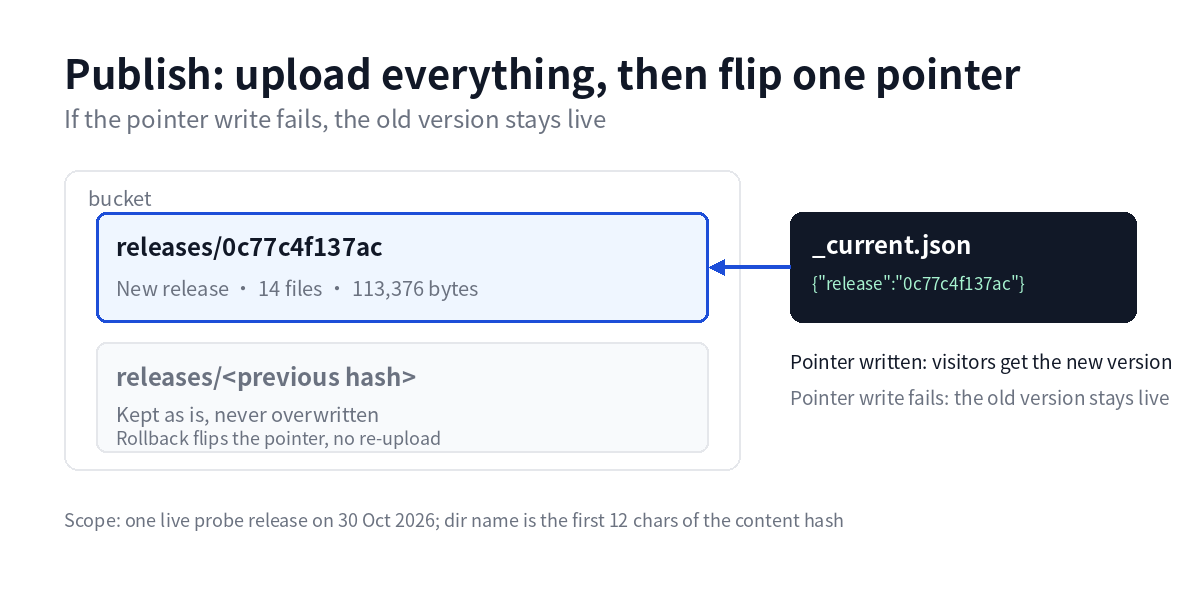
On 30 October the release chain pushed real files to object storage for the first time. A probe site went out as 14 files and 113,376 bytes. After the pointer write, a different tool read it back and the content matched.
Before that, the chain only wrote to a local directory. A drill and a live release differed by one switch.
What goes wrong when files are copied over
Publishing with FTP or a sync command makes every file its own event. Halfway through, the homepage can already carry the new template while the stylesheet is still the old one. An image path changes, the new file has not arrived, and the page shows an empty box.
Anyone opening the site during that window gets a page stitched from two versions.
Rollback is worse. The old files were overwritten, so the only option is to find the previous build and upload it again, with the same window open a second time.
One directory per version
| Object | What it holds |
|---|---|
sites/<host>/releases/<12-char hash>/ |
Every file in that release |
sites/<host>/_current.json |
The release that is live |
A release does two things. It uploads the new version into its own directory, then rewrites the pointer with the new 12-character hash.
The old directory stays untouched. A rollback rewrites the pointer, and not one byte is uploaded again.
The directory name comes from the first 12 characters of the content hash. Same content, same name, so a repeated release creates no second copy.
The pointer is written last
The upload loop sends one file at a time. Only when every file has landed does the code write _current.json.
Reverse the order and the pointer arrives first. Files are still missing, and visitors get a 404.
With the current order, a failed pointer write leaves production on the old release. The site is stale, but whole.
Those two steps sit a few lines apart in the code. A single test exists for this alone: a failed pointer write must not leave a mixed state.
Retries depend on the status code
A 4xx raises immediately. A wrong path or a token without write permission returns the same answer ten times.
A 5xx or a timeout gets 2 retries, waiting 1 second and then 2.
The split saves time. A brief network reset clears on the retry. A permission error only repeats itself three times.
Acceptance reads 14 files
The probe release recorded 14 files, 113,376 bytes, release 0c77c4f137ac.
After the pointer write, a second tool read _current.json and confirmed the release. Then index.html and sitemap.xml were opened and compared.
That second check is not optional. The same client writing and reading only proves it agrees with itself.
The probe objects were deleted afterwards. Nothing was left in the bucket.
An upload gate sits in front
One release is capped at 5000 files and 512 MB. Above that the adapter raises, and the job goes to approval.
A typical export site runs a few dozen pages, a few hundred objects. Tens of thousands in one release usually means a dependency folder or a log directory was packaged by mistake.
Drills by default
The adapter defaults to local, writing only to a local directory. A live release requires setting CF_DAG_ADAPTER=r2.
That switch is deliberate. Automation running smoothly while nobody watches deserves more suspicion, not less.
Credentials for a live release come from a file outside the repository. They are not written into code and not printed to logs.
What a small site needs
| Sites | Update rhythm | Approach |
|---|---|---|
| 1 | Once or twice a month | Upload by hand, keep one previous copy |
| 2 to 5 | Weekly | Version directories plus a pointer |
| More than 5 | Something daily | Add approvals and a release ledger |
Object storage is optional. Keep current and previous directories on the server, upload into the new one, then point a symlink at it.
A symlink swap is atomic. It behaves the same way as a pointer write.
FAQ
Do visitors see the old page during an update
After the pointer flips, new requests read the new version. Browser and CDN caches are a separate layer, so images and stylesheets need their own cache headers or a local browser can still hold old files.
How long does a rollback take
One pointer write, usually under a second. The previous directory is still there and nothing is uploaded again. How many versions you keep depends on storage cost; ten releases is a common choice.
Do release directories pile up
Yes. Prune by count, for example keep the last ten and delete older ones. Check that no rollback is pending before deleting.
Is this worth it for a small site
For a site updated once or twice a month, manual upload and one backup are enough. With weekly edits, or several people editing, version directories and a pointer remove most of the argument about who overwrote what.
Last updated: 2026-11-01