A friend bought a domain at 38 CNY for the first year and thought he had a bargain. The renewal notice a year later asked for 1,200. By then the site had rankings, backlinks and customer email threads pointing at that name, so he paid.
Twenty minutes of checking before payment would have avoided six months of cleanup. These are the five checks we now run on every domain, in this order.
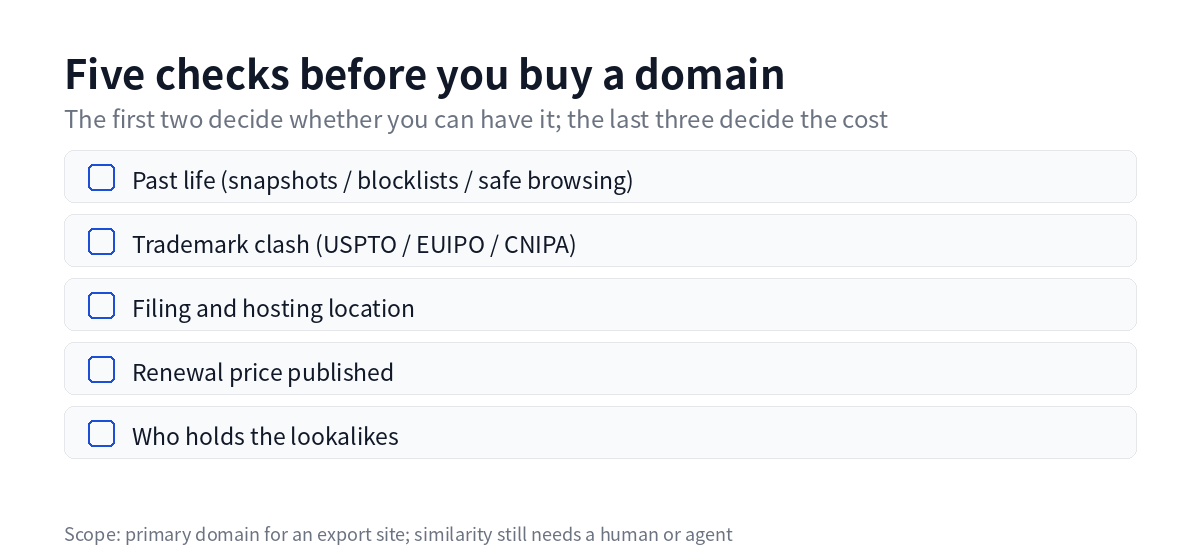
Check 1: What the domain did in a previous life
Domains get dropped and re-registered. If the last owner sent spam, ran a casino redirect or hosted counterfeit goods, search engines and mail providers may still remember.
How to check: search site:domain for anything indexed, pull snapshots from the Wayback Machine, run the domain against public DNSBL lists, and check Google Safe Browsing status.
Pass mark: no gambling, adult content, pharma or replica history in the snapshots, and the root domain is not on the major blocklists.
Why it matters: a flagged domain takes months to clean up, and cold email from it lands in spam from day one. The thirty yuan you saved does not cover that.
Check 2: Trademark conflict, in three registers
This is the check people skip, and it has the worst downside. Register a name close to an existing brand, build the site, and a letter from a law firm can take the domain away.
How to check: search the core word in the trademark register for each market you sell into — USPTO for the US, EUIPO for the EU, CNIPA for China. Search the bare word once, then the word plus your product class.
Pass mark: no live mark on the core word in your category, or a holder who does not trade in that category.
Caveat: a register search tells you whether an identical mark exists. It does not settle whether yours is confusingly similar. When the answer is close, rename. It is cheaper than arguing.
Check 3: Filing and hosting, decided together
This determines whether you can ever host in mainland China.
The rule: a domain pointing at a mainland server needs an ICP filing. A domain pointing at overseas hosting, Cloudflare or a VPS abroad, does not. The .cn suffix requires real-name registration wherever it is hosted, and sometimes a filing on top.
Pass mark: hosting location decided first, filing requirement derived from it. Do it the other way round and you finish the build before discovering the server is unusable.
The practical version: if your buyers are abroad, host abroad and skip the filing entirely. The filing needs time and corporate paperwork that a small exporter would rather spend on samples.
Check 4: Is the renewal price on the page
Registrars advertise the first-year price and bury the rest. First year 38, renewal 1,200, is an ordinary price list in this industry, not a scam.
How to check: the registrar's pricing page usually carries a table with first-year, renewal and transfer columns. Read the renewal column. If the page only shows the first year, buy elsewhere.
Pass mark: renewal is published and you can live with that number in ten years.
Reference point: Cloudflare Registrar sells at cost, around 10.44 USD a year for .com, same price to register and renew, WHOIS privacy included. Use it as your comparison line, whether or not you buy there.
Three traps come with cheap domains: the renewal jump, a transfer lock, and exposed WHOIS data. All three can be settled before payment.
Check 5: Who holds the lookalikes
Customers type domains by hand. exmaple.com and example.com differ by two letters, and the traffic goes to whoever owns the typo.
How to check: generate variants of the core word — other suffixes, a hyphen, one letter dropped, one added — and look up registration status for each.
Pass mark: the main suffixes are either registered defensively by you, or held by a normal business. If a lookalike resolves to a replica store or a betting page, pick a different name.
Cost: defensive registration is usually two or three names, not the full grid.
Three kinds of registrar
| Type | First year | Renewal | Fits whom |
|---|---|---|---|
| At-cost registrar | near cost | same as first year | long-term holding |
| Promotional registrar | very low | well above first year | short projects you can migrate |
| Registrar bundled with a site builder | inside the package | often undisclosed | people who never want to touch DNS |
Two traps when you add domains in bulk
Once you run more than a couple of sites, domains arrive as a list rather than one at a time. Two mechanics are worth knowing first.
Duplicate creation. Most platforms refuse to create the same resource twice. Submit the same zone again and the API answers "already exists". The script has to recognise that code, re-read the record and skip it, rather than counting it as a failure. Otherwise one rerun turns the ledger red.
Slow certificates. A newly added domain usually has its certificate still issuing. That reads as pending, not failed. Mark it as waiting and look again in ten minutes; paging someone at that moment buys nothing.
Both come down to one sentence: batch operations must be idempotent. Same input ten times, same result, and a partial failure only redoes the step that failed.
Using the checklist
Work through it in order before paying. History and trademark decide whether you can have the domain at all. Hosting and filing decide whether you can change your mind later. Renewal price and lookalikes decide what it costs.
Write the outcome into one table: domain, registrar, renewal price, expiry date, status. Three months later you will still know why each name was bought.
Where this does not apply
This covers domains for an export site: one primary domain per site, plus a few defensive registrations.
Two cases fall outside. Pure marketplace sellers do not need a domain at all. Companies with an existing brand domain usually put a new site on a subdomain, and the work becomes subdomain planning and passing authority from the main site.
The checklist also stops at "can I buy this". DNS records, CDN, and keeping certificates renewed are a separate line, covered in the pre-launch checks in the launch checklist.
FAQ
Does the domain have to be .com?
For buyers in Europe and North America, yes by default; people type .com without thinking. For a single national market a local suffix is better — .de for Germany, .jp for Japan. .cn suits domestic business, but it requires real-name registration and sometimes a filing.
Can I move a cheap first-year domain away before the renewal?
Yes, with lead time. A domain can transfer 60 days after registration, and you need the transfer unlocked and the authorisation code in hand. Start close to expiry and you end up stuck inside the window.
Is a self-serve trademark search good enough?
It answers "is there an identical mark" well. It answers "is this confusingly similar" badly, because that turns on logo, sound and product class. Pay an agent a few hundred for a formal search on your core brand name; it is cheaper than a letter from a lawyer.
Should WHOIS privacy be on?
Yes. Without it your name, email and phone are public and get scraped for spam and scam calls. Most registrars now include privacy free.
Will a registrar throttle bulk registration?
Yes. Many orders from one card in a short window trips risk control. Order in batches, use real entity details, and avoid keyword-stuffed names.
Last updated: 2026-10-22